Securing a Fresh Ubuntu VM for a Tor Relay: A Beginner's Checklist
Part 1 of a two-part series on securing Tor relay hosts after the October 2026 intrusions. 1. Securing a Fresh Ubuntu VM for a Tor Relay (you are here) — one non-exit relay. 2. Hardening Tor Relay Hosts After the October 2026 Intrusions (coming soon) — several relays, offline keys, monitoring, incident response.
Short answer: open exactly two doors, SSH for you (keys only, never a password) and the ORPort for Tor, then check from outside that the relay publishes only what you set. Five steps, about 30 minutes:
- Prepare: unique passwords, an SSH key, Ubuntu's official image
- Lock SSH to keys: an admin user, no passwords over SSH
- Open two ports: SSH and Tor, nothing else
- Install Tor from the Tor Project: updated automatically
- Prove it, then check monthly: from outside, plus a quick Ebury check
Why Now #
Between October 1 and 4, 2026, 377 relays run by 59 operators switched to one of two exit policies that open SSH (our analysis). On October 5 the Tor Project warned that attackers were breaking into Linux relay hosts and editing torrc so the relays would intercept SSH logins made through Tor, and one victim's captured credentials were then used to log in to his server. The directory authorities removed the relays.
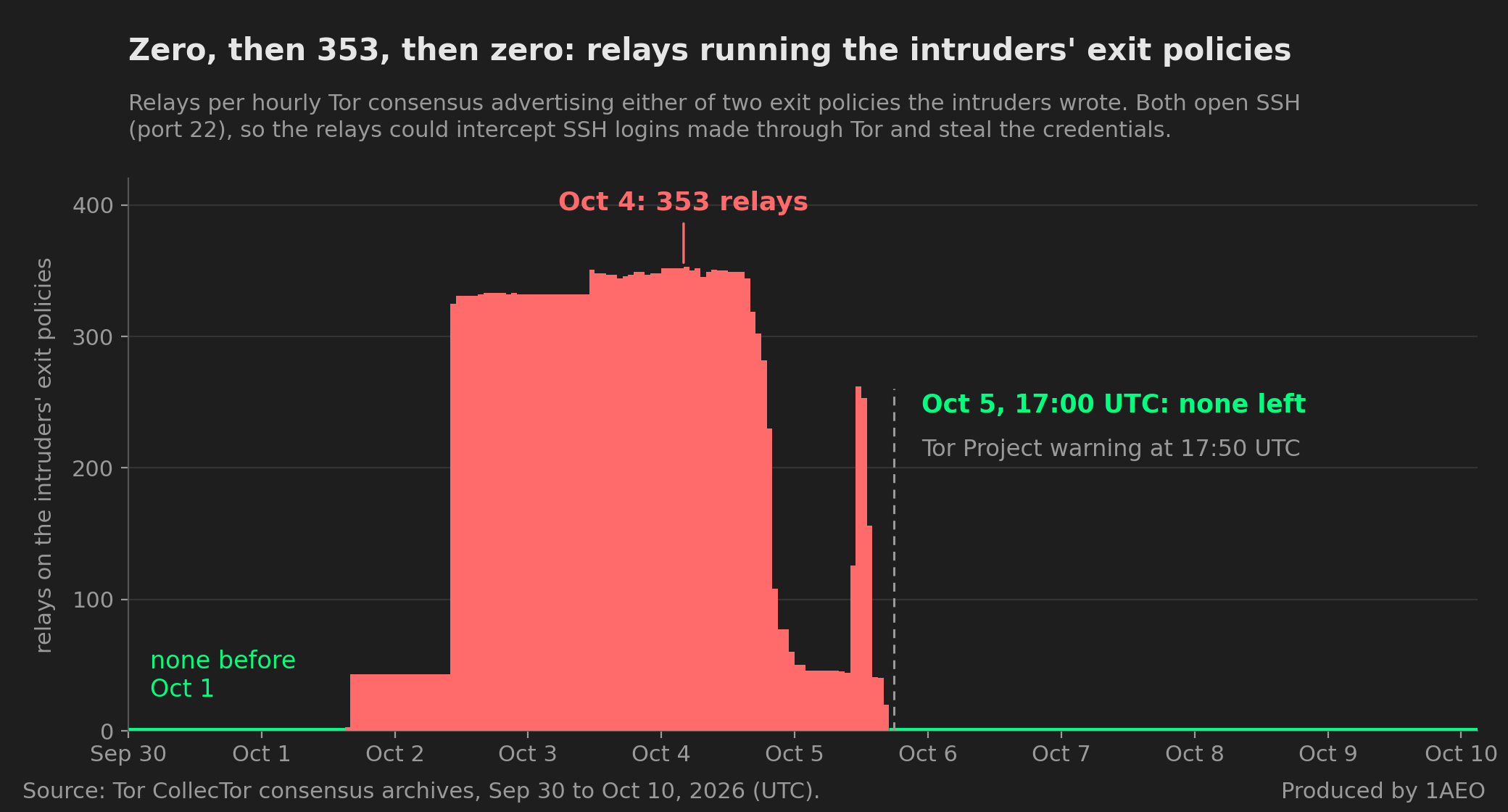
The one break-in documented in detail (post-mortem) began with one password reused for SSH, sudo and backups, with SSH password logins on. The attacker then installed Ebury 1.8.3, an OpenSSH backdoor that records every password typed into sshd and hides from the host. 81 of the other operators' 100 affected relays were at FranTech Solutions (BuyVM), AS53667; whether the provider itself was breached is unconfirmed.
1. Prepare #
- Unique passwords, kept in a password manager. Never reuse one, and never put one in a script or file on a server. Turn on two-factor login for your hosting account and the email that can reset it: the provider's console is root on your VM.
- Make an SSH key on your own computer (set a passphrase when asked) and paste the
.pubfile's contents into the provider's SSH-key field when you create the VM:
ssh-keygen -t ed25519 -C "relay01"- Pick Ubuntu's official 24.04 or 26.04 image on a full VM, and run nothing else on it.
2. Lock SSH to Keys #
Log in with the account your provider gave you, usually root or ubuntu. On the first connection, check that the fingerprint ssh shows matches the one in the provider's console or boot log. Then update, add an admin user with your key, and lock SSH to keys:
sudo apt update && sudo apt full-upgrade -y && sudo apt install -y ufw gnupg && sudo reboot # then log back insudo adduser relayadmin # give it a unique password: sudo will ask for it
sudo usermod -aG sudo relayadmin
sudo cp -r ~/.ssh /home/relayadmin/ && sudo chown -R relayadmin:relayadmin /home/relayadmin/.ssh
sudo passwd -l rootsudo tee /etc/ssh/sshd_config.d/00-hardening.conf >/dev/null <<'EOF'
PermitRootLogin no
PasswordAuthentication no
KbdInteractiveAuthentication no
AuthenticationMethods publickey
AuthorizedKeysFile .ssh/authorized_keys
AllowUsers relayadmin
DisableForwarding yes
LogLevel VERBOSE
EOF
sudo sshd -t && sudo systemctl reload sshKeep this session open, and check that ssh relayadmin@192.0.2.10 (your server's IP) works from a second terminal. From now on, use only relayadmin. Two rules come straight from the break-in above:
- If SSH ever asks this server for a password, stop. Your server never will, so something else is answering.
- The relay is a destination, never a starting point. Never
sshorscpfrom it, and never usessh -A.
3. Open Two Ports #
sudo ufw default deny incoming
sudo ufw allow 443/tcp       # Tor
sudo ufw limit 22/tcp        # SSH, with brute-force limiting
sudo ufw --force enable
If you always connect from the same address, allow SSH only from there (your address in place of 203.0.113.25): sudo ufw allow from 203.0.113.25 to any port 22 proto tcp, then sudo ufw delete limit 22/tcp. If that address ever changes, log in through your provider's web console as relayadmin to update the rule.
4. Install Tor From the Tor Project #
Ubuntu's own tor lags behind the Tor Project's security fixes, and the Tor Project says to install from its own repository instead. Add it, and check its key before you install anything:
. /etc/os-release
sudo tee /etc/apt/sources.list.d/tor.sources >/dev/null <<EOF
Types: deb
URIs: https://deb.torproject.org/torproject.org/
Suites: ${VERSION_CODENAME}
Components: main
Signed-By: /usr/share/keyrings/deb.torproject.org-keyring.gpg
EOF
curl -fsSL https://deb.torproject.org/torproject.org/A3C4F0F979CAA22CDBA8F512EE8CBC9E886DDD89.asc \
  | gpg --dearmor | sudo tee /usr/share/keyrings/deb.torproject.org-keyring.gpg >/dev/null
gpg --show-keys /usr/share/keyrings/deb.torproject.org-keyring.gpg
# stop unless the line under "pub" reads A3C4F0F979CAA22CDBA8F512EE8CBC9E886DDD89
Install Tor, let Ubuntu's automatic updates include it, and give it a minimal config:
sudo apt update && sudo apt install -y tor deb.torproject.org-keyring
echo 'Unattended-Upgrade::Allowed-Origins { "TorProject:${distro_codename}"; };' \
  | sudo tee /etc/apt/apt.conf.d/52unattended-upgrades-tor >/dev/null
sudo tee /etc/tor/torrc >/dev/null <<'EOF'
Nickname      myRelay01
ContactInfo   email:tor[]example.com ciissversion:3
ORPort        443
ExitRelay     0
SocksPort     0
EOF
sudo systemctl restart tor@default
sudo journalctl -u tor@default -f      # wait for "...reachable from the outside. Excellent.", then Ctrl+C
5. Prove It, Then Check Monthly #
Reboot, then confirm each row. The last one works once the relay is published, about three hours after Tor first starts. sudo cat /var/lib/tor/fingerprint shows its FINGERPRINT.
| Check | Expect |
|---|---|
sudo ss -tlnpH | grep -vE '127\.0\.0\.|\[::1\]' | only SSH (sshd, systemd) and tor |
ssh -o BatchMode=yes -o PubkeyAuthentication=no relayadmin@192.0.2.10 (from your computer) | Permission denied (publickey). |
apt-cache policy tor | installed from deb.torproject.org |
curl -s "https://onionoo.torproject.org/details?lookup=FINGERPRINT&fields=flags,exit_policy_summary" | no "Exit" flag; {"reject":["1-65535"]} |
Every month, and whenever tor-relays reports an incident:
- Rerun the last row. It's the one check an intruder can't fake, and the way this incident was caught. Sign up for Tor Weather to be emailed if the relay goes offline.
- Run the quick Ebury check below. Log in with your key and type no password. It runs the checks in a fresh shell that current Ebury builds don't hide from. A clean result is no guarantee; Part 2 (coming soon) goes deeper.
H=1 I=1 LD_PRELOAD=":" LD_DEBUG=":" bash -c '
find /usr/lib -name "libkeyutils*" -perm -4000 2>/dev/null   # must print nothing
grep -E "@event-|@/dev/(event|stats)-" /proc/net/unix         # must print nothing
grep -rniE "^\s*(%include|ExitRelay|ExitPolicy)" /etc/tor/     # only "ExitRelay 0"
'
If Something Is Off #
- Type no password into that host. Snapshot its disk in the provider panel, then power it off.
- Email
bad-relays@lists.torproject.orgwith the fingerprint, the IP address and what you found. - Rebuild on a fresh VM with this checklist and a new relay identity.
- Change every password you typed there. Once you're clean, ask
bad-relays@to lift any block on your IP address.
References: Tor Project incident notice, Debian/Ubuntu relay guide, package repository, automatic updates and bad-relay reporting; the Ebury 1.8.3 post-mortem; ESET, "Ebury is alive but unseen" (2024); exit-policy counts from Tor's public CollecTor archives.