Periodic Restarts: A Brute-Force Workaround For Reducing Guard Memory
If you can't change your memory allocator, scheduled restarts offer a fallback strategy. We tested three restart intervals across 30 relays to measure effectiveness—and the tradeoffs.
The Results
| Restart Interval | Avg Memory | vs Control | Tradeoff |
|---|---|---|---|
| Every 24 hours | 4.88 GB | -13% | High churn |
| Every 48 hours | 4.56 GB | -19% | Moderate |
| Every 72 hours | 5.29 GB | -6% | Low impact |
| Control (no restarts) | 5.64 GB | — | Baseline |
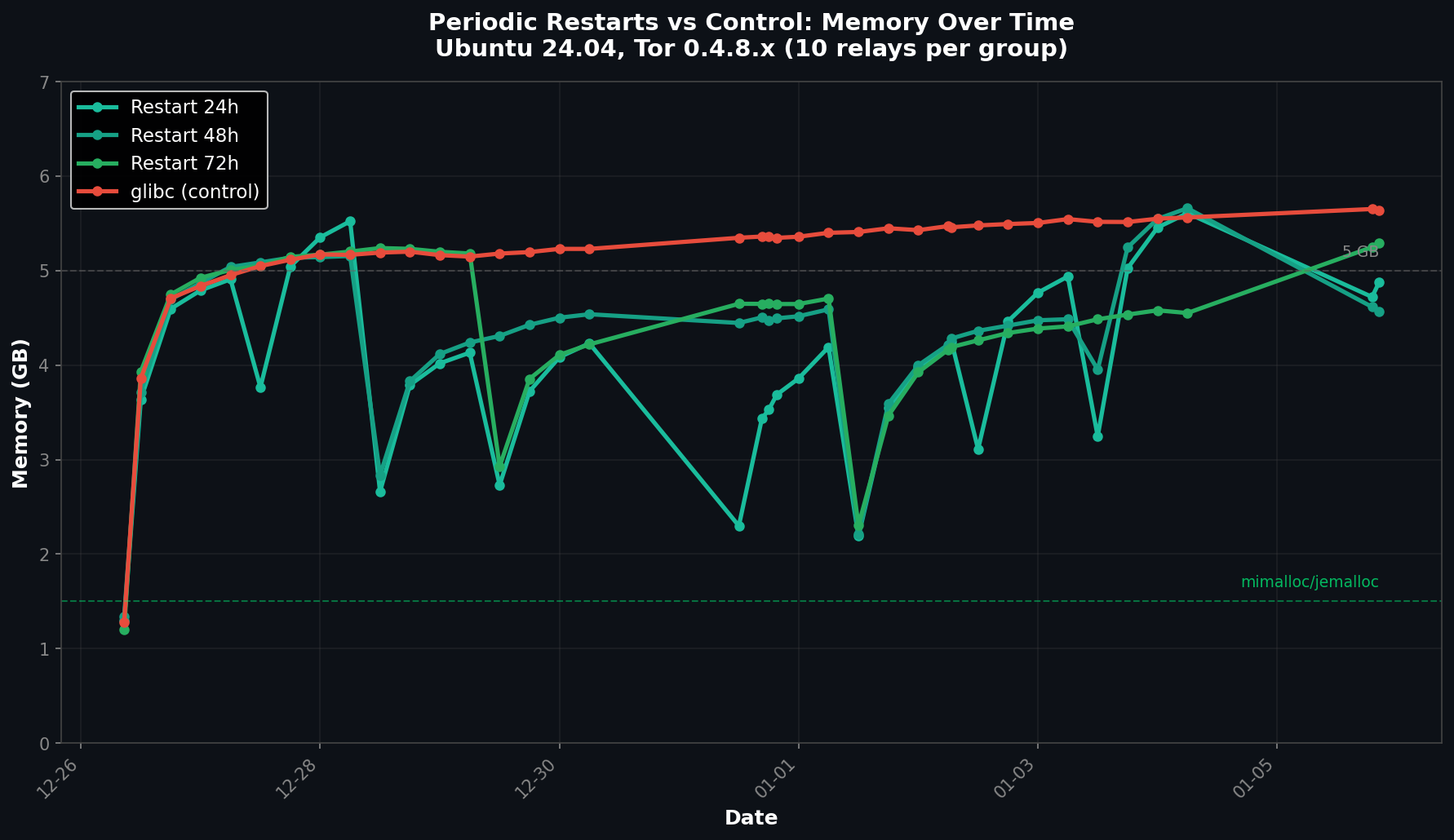
The 48-hour interval performed best, but even then memory averaged 4.56 GB—still 3-4x higher than what modern allocators achieve (1.1–1.6 GB).
Why Restarts Help (A Little)
Restarting a Tor relay forces the process to release all memory back to the OS and start fresh. For the first 24-48 hours after restart, memory usage is reasonable. Then fragmentation kicks in and RSS climbs back toward 5+ GB.
The sawtooth pattern is predictable:
- Hour 0: Fresh start, ~500 MB
- Hour 24: Climbing, ~2-3 GB
- Hour 48: Fragmented, ~4-5 GB
- Hour 72+: Plateau at 5+ GB
The Tradeoffs
Scheduled restarts come with costs:
- Circuit disruption: Active circuits are terminated, forcing clients to rebuild
- Warmup period: Relay must re-establish connections and rebuild routing tables
- Operational overhead: Requires cron/systemd timers and monitoring
- Diminishing returns: 24h restarts only save ~13% vs no restarts
Implementation
If you must use restarts, here's a systemd timer approach:
# Create timer: /etc/systemd/system/[email protected]
[Unit]
Description=Restart Tor relay %i every 48 hours

[Timer]
OnBootSec=48h
OnUnitActiveSec=48h
RandomizedDelaySec=1h

[Install]
WantedBy=timers.target
# Enable for a relay
sudo systemctl enable --now tor-restart@relay_name.timerThe RandomizedDelaySec staggers restarts across relays to avoid simultaneous disruption.
When to Use Restarts
- Temporary measure while planning allocator migration
- Constrained environments where you can't install packages
- Monitoring validation to confirm memory returns to baseline
Better Alternative
Restarts are a band-aid. Switching to mimalloc or jemalloc eliminates the need entirely—memory stays flat at 1-2 GB indefinitely without any service interruption.
| Approach | Memory | Service Impact |
|---|---|---|
| mimalloc 2.1 | 1.16 GB | None |
| jemalloc 5.3 | 1.63 GB | None |
| 48h restarts | 4.56 GB | Every 48 hours |
| No action | 5.64 GB | None (but wasted RAM) |
📊 Raw data: View experiment data and relay configs on GitHub